What WHIP Is, and How to Stream with It from OBS
WHIP, the WebRTC-HTTP Ingestion Protocol, is the IETF standard for sending a live stream into a WebRTC service: the encoder makes one HTTP request with a bearer token, and the picture and sound then flow as WebRTC packets, which viewers can watch about a second behind. To stream with it from OBS 30 or later, choose WHIP as the service in Settings → Stream and paste in the server address and the bearer token your service gives.
This post explains what happens between those two fields and the first frame, what WHIP changes for the person streaming, how it relates to RTMP and WHEP, and how to send it from OBS and FFmpeg. It ends with WHIP on a WordPress site, with Live Stream. For every way to stream on WordPress, start with How to live stream on a WordPress site.
WHIP at a glance
| WHIP | |
|---|---|
| Full name | WebRTC-HTTP Ingestion Protocol |
| Standard | RFC 9725, IETF Standards Track, March 2025 |
| What it does | Starts and stops the session that carries a stream from an encoder into a WebRTC service |
| What you enter | A server address and a bearer token |
| How the setup travels | HTTPS requests |
| How the stream travels | WebRTC: packets over UDP where the network allows, played as they arrive |
| Encryption | Always, as every WebRTC session is |
| Sizes for slow connections | Allowed as layers, sent by the encoder (OBS 32.1 and newer sends up to four) |
| Codecs | Not fixed by the standard, agreed between the encoder and the service |
| Encoders | OBS 30 and newer, FFmpeg 8 and newer, and others |
Before WHIP, every WebRTC service had its own way to start a session, so an encoder needed code for each service. WHIP gives them one, which is why OBS could add a single WHIP service that works with any service that takes it.
How a WHIP stream starts
WHIP is only the start and the end. Everything between is ordinary WebRTC, the same technology browsers use for video calls. RFC 9725 describes four steps:
- The offer. The encoder sends an HTTP POST to the server address, with the bearer token in its
Authorizationheader and a body of typeapplication/sdp: its offer, a description of the media it will send, its codecs, any layers, and how to reach it. - The answer. The service checks the token and answers
201 Created, with its own description of what it takes and aLocationheader, the address of this one session. It may add the STUN and TURN servers the encoder should use, asLinkheaders. - The stream. The two sides find a network path between them, set up encryption, and the picture and sound flow as WebRTC packets. If the network changes, the encoder sends new paths, or restarts the connection, with a PATCH to the session address.
- The end. When you stop streaming, the encoder sends a DELETE to the session address, and the service closes the session.
A few details from the standard that show up in practice:
- The encoder only sends. The service answers that it only receives, so nothing comes back to the encoder but the signals WebRTC needs.
- One stream per session, with at most one picture and one sound in it.
- Redirects are allowed. A service may send the encoder on to another server with an HTTP 307, which is one way to spread streams over many servers.
- HTTPS is required, so the token and the offer never travel in the clear.
What the standard leaves to the service
- Codecs. RFC 9725 fixes none. The offer lists what the encoder can send, and the answer picks what the service takes. For a stream watched in browsers, H.264 for the picture and Opus for the sound are the safe pair, as the standards require every WebRTC browser to play H.264 and Opus.
- The token. Any bearer token works. The service makes it and decides how long it lasts.
- What viewers get. WHIP only takes the stream in. How it reaches viewers, and with which delay, depends on the service behind it.
What WHIP changes for the person streaming
The setup feels like RTMP. A server address and a key, pasted into two fields. The OBS WHIP guide calls the bearer token the WHIP name for a stream key.
The delay can stay low all the way. When the service passes the WebRTC packets on to viewers as they arrive, viewers watch about a second behind the host, close enough to answer a question in the chat while it is still on screen. Low latency live streaming: why WebRTC explains where that second comes from, and WebRTC vs HLS why a stream cut into files waits many seconds.
The encoder can send the layers. With simulcast, the encoder sends the full picture and smaller copies of it at once, and the media server gives each viewer the one their screen and connection take. The server encodes nothing again. In OBS this is Total Layers, from 32.1: one layer is the full picture, two add a copy at half its size, three send the full picture with copies at 66% and 33%, and four at 75%, 50% and 25%.
It is always encrypted. WebRTC sends media over SRTP, keyed through DTLS, with no way to turn that off (RFC 8827).
Networks matter more. The setup is HTTPS, which every network lets through, and the stream then prefers UDP. A network that lets no UDP out needs TCP to the media server or a relay, a TURN server, which a service can hand the encoder in its answer. The WebRTC test of WordPlus Cloud shows from the computer you stream on whether UDP gets out.
Keyframes and B-frames still count. A viewer sees the picture from the next keyframe on, so keyframes far apart make them wait. And browsers skip B-frames, so a picture sent with them stutters. The OBS settings for both are below.
WHIP and RTMP
| RTMP | WHIP | |
|---|---|---|
| What you enter | Server address and stream key | Server address and bearer token |
| How the stream travels | One TCP connection, every byte in order | WebRTC packets, mostly over UDP |
| What the server usually does | Turns it into HLS files for viewers | Passes the packets on to viewers |
| Smaller copies for slow connections | Encoded again on the server | Sent by the encoder as layers |
| Encryption | Only as RTMPS | Always |
Both are ways in. RTMP is still what most streaming services take, and WHIP is the way into WebRTC. The whole route, and the delay of each, is in RTMP vs WebRTC: sending a live stream and watching it.
WHIP and WHEP
WHEP, the WebRTC-HTTP Egress Protocol, is the other direction: a player asks a server for a stream the same way an encoder sends one over WHIP. It comes from the same IETF working group, WebRTC Ingest Signaling over HTTPS, and it is not an RFC yet: its latest draft, from October 2026, is still under review.
A service does not need WHEP to play a WebRTC stream. Many give viewers a player of their own that connects to the media servers by itself, and Live Stream does so on the pages of your site.
How to stream with WHIP from OBS
You need OBS 30 or later, and 32.1 or later for layers. On Ubuntu 24.04, the OBS guide says to use its Flatpak, as the PPA build has no WHIP.
- Get the server and the token from your service.
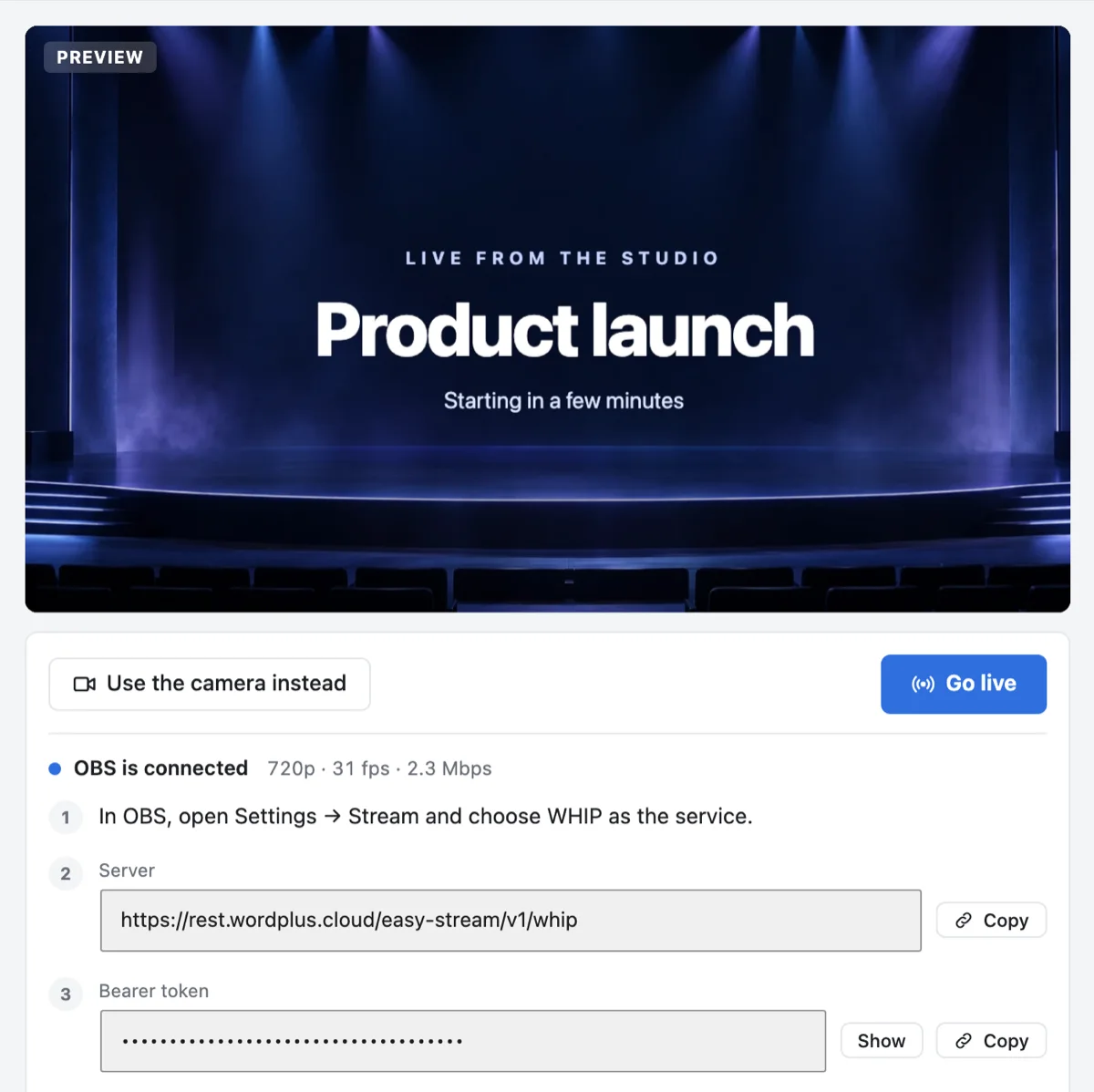
- In OBS, open Settings → Stream and choose WHIP as the service.
- Paste the server address into Server and the token into Bearer Token.
- Set Total Layers, in the same window, if your service takes layers. Each layer needs its own encoding and more upload.
- In Settings → Output, choose the Advanced output mode and, under Streaming, set Keyframe Interval to 1 s and Max B-frames to 0, keeping the video encoder you had.
- Press Start Streaming.
If OBS says it could not access the stream key, it says so whatever the server answered: check that the server and the token were copied whole and that the token is still the current one.
Step by step settings for a WordPress site, with the bitrate, sizes and what to change when the picture stutters, are in How to stream from OBS to WordPress over WHIP.
How to stream with WHIP from FFmpeg
FFmpeg has a WHIP output from version 8. ffmpeg -muxers lists whip when your build has it. This sends a video file as a live stream, with a keyframe every second at 30 frames a second and no B-frames:
ffmpeg -re -i show.mp4 \
  -c:v libx264 -profile:v baseline -bf 0 -g 30 -pix_fmt yuv420p \
  -preset veryfast -tune zerolatency -b:v 2500k \
  -c:a libopus -ar 48000 -ac 2 -b:a 96k \
  -f whip -authorization "BEARER_TOKEN" "SERVER_ADDRESS"
Put the token and the server address your service gives in place of BEARER_TOKEN and SERVER_ADDRESS. -re reads the file at its own speed, as a live source would send it.
WHIP on a WordPress site, with Live Stream
Live Stream is a live streaming plugin for WordPress. Viewers watch on the pages of your site over WebRTC, about a second behind the host, through the media servers of WordPlus Cloud. It takes a stream from OBS 30 or later and from any other encoder that sends WHIP, FFmpeg 8 among them:
- The server and the token come from the studio. In Live Stream → Studio, choose Go live beside the stream, then Stream from OBS. Only the hosts of the stream see its token, the same each time until New key makes another, which cuts off an encoder still using the old one.
- WordPlus Cloud takes the offer. It checks the token, the subscription of the site and that the stream may take an encoder now, then hands the offer to a media server. From then on the picture goes straight from the encoder to that server, which passes it on to each viewer.
- One encoder per stream. A second encoder with the same token takes the place of the first.
- You see it before viewers do. The studio previews what arrives, with its size, frame rate and bitrate, and says when the keyframes are too far apart, when B-frames make it stutter, or when the picture is bigger than the 1080p a stream takes. Viewers see it once you press Go live.
- Or it goes live by itself. With Go live when OBS connects on in the settings of the stream, it goes live as soon as the encoder connects with its token, for a stream sent from a computer that is always on.
The full reference is in Streaming from OBS.
What it does not do: it takes no RTMP yet, so an encoder that only sends RTMP cannot stream to it.
What it costs
The plugin is free to download, and streaming runs on a WordPlus Cloud subscription. Each site streams to 50 viewers at once unmetered, however long they watch. Above that, each viewer takes a credit a minute. Each WordPress site adds 5,000 credits a month to its account, and more are on the pricing page of WordPlus Cloud. Recording takes a credit a minute besides. Hosts take no credits, whether they send from the browser or over WHIP. The details are in Viewers and credits.
Frequently asked questions
Is WHIP the same as WebRTC?
No. WHIP is how the session starts and ends: an HTTP request with an offer, an answer, and a DELETE at the end. The picture and sound in between are WebRTC.
Is WHIP better than RTMP?
For a stream watched in the browser with low delay, it saves a step: the stream stays WebRTC from the encoder to the viewer, and the encoder sends the smaller copies. To send to a service that only takes RTMP, RTMP is what works.
Which OBS version supports WHIP?
OBS 30 and newer. Layers, which OBS calls Total Layers, come with 32.1.
What is a WHIP bearer token?
The key of the stream. The service makes it, and the encoder sends it with every request. Anyone who has it can send to your stream, so keep it like a password, and ask your service for a new one if someone saw it.
What port does WHIP use?
Its requests go over HTTPS, usually port 443. The stream then uses the ports of the media server, over UDP where the network allows.
Can I watch a WHIP stream in a browser?
Yes, once a service passes it on. WHIP only takes the stream in. Viewers watch through the player of the service, or over WHEP where a service offers it.
Does Live Stream take RTMP?
Not yet. It takes streams over WHIP, from OBS 30 or later and any other WHIP encoder, and from the browser, with a camera, a microphone and a shared screen (Going live from the browser).