RTMP vs WebRTC: Sending a Live Stream and Watching It
RTMP and WebRTC do different jobs today: RTMP carries a live stream from an encoder such as OBS to a server, and no current browser plays it, while WebRTC plays a stream in every current browser about a second behind the host, and can take the stream in as well, over WHIP. Use RTMP to send into a service that only takes RTMP, and WebRTC from the encoder to the viewer when viewers talk back and the delay matters.
This post explains what each protocol does on the way in and on the way out, the three usual routes from an encoder to a viewer and the delay each gives, and what to check on your network. It ends with how Live Stream takes a stream on a WordPress site: over WHIP, not RTMP. For every way to stream on WordPress, start with How to live stream on a WordPress site.
RTMP and WebRTC at a glance
| RTMP | WebRTC | |
|---|---|---|
| Made for | Flash Player, which browsers no longer run | Video calls in the browser |
| Its job today | Sending a stream from an encoder to a server | Watching in the browser, and sending over WHIP |
| How it travels | One TCP connection, every byte in order | Packets over UDP where it can, played as they arrive |
| Usual port | 1935, or 443 for RTMPS | 443 for setting it up, then the ports of the media server |
| Plays in a browser | No | Yes, in every current browser |
| Codecs | H.264 and AAC, more with Enhanced RTMP | H.264 and VP8 in every browser, often VP9 and AV1, with Opus for sound |
| Behind the host | Seconds, once the server turns it into HLS | About a second, when it stays WebRTC to the viewer |
| Encryption | Only as RTMPS | Always |
| Sizes for slow connections | Usually made by the server, which encodes the stream again | Sent by the encoder as layers, and picked for each viewer |
What RTMP does today
RTMP, the Real-Time Messaging Protocol, was made for Flash Player, to send video, sound and data between a player and a server. Its specification, as Adobe published it in 2012, describes messages over one reliable connection, such as TCP, delivered in order. The usual port is 1935. RTMPS is the same protocol inside TLS, which many services ask for, often on port 443.
Flash is gone. Adobe stopped supporting Flash Player on December 31, 2020, and blocked Flash content from January 12, 2021. No current browser plays RTMP, so a stream sent over RTMP is always turned into something else before anyone watches it.
What RTMP kept is the first mile. Encoders such as OBS, hardware encoders and the live features of many apps send RTMP, and many streaming services take it. It is simple to set up, a server address and a stream key, and almost everything speaks it.
Classic RTMP carries H.264 video and AAC sound. Enhanced RTMP, published in 2023 by the Veovera Software Organization, adds HEVC, VP9 and AV1, so an encoder can send newer codecs to services that support it.
What WebRTC does
WebRTC is what browsers use for video calls, where a delay of seconds would make talking impossible. It sends small packets, mostly over UDP, and the receiver plays each as soon as it arrives, with a buffer of a fraction of a second.
- It plays in every current browser, on computers and phones, with no plugin. The standards require every WebRTC browser to support VP8 and H.264 for video and Opus and G.711 for sound.
- It keeps the live moment. A lost packet is asked for again or left out, and when a connection slows down, the media server sends that viewer a smaller layer. Nothing waits for one late packet.
- It is always encrypted. WebRTC sends its media over SRTP, with no way to turn that off.
For a stream, WebRTC runs through media servers. The host sends one stream to a server, and the server passes the packets on to each viewer. More on where the second comes from: Low latency live streaming: why WebRTC.
Three routes from the encoder to the viewer
"RTMP vs WebRTC" is often really a question about the whole route, as the way in and the way out can differ.
RTMP in, HLS out
The most common route. The encoder sends RTMP to a server, which cuts the stream into files of a few seconds each and hands them to viewers as HLS, through a CDN. It reaches any audience, and it puts viewers from several seconds to half a minute behind the host, because players wait for those files to be written. WebRTC vs HLS: the delay you get and when each fits shows where each second comes from.
RTMP in, WebRTC out
The server takes RTMP and gives it to viewers over WebRTC. Viewers can then watch with low delay, but the server does more on the way:
- The sound is encoded again. RTMP usually carries AAC, which browsers do not play over WebRTC, so the server turns it into Opus.
- B-frames. RTMP encoders often send B-frames, which browsers do not play well over WebRTC, so the picture stutters unless the encoder sends none or the server encodes the video again.
- One size. Classic RTMP carries one picture, so smaller copies for slow connections are encoded on the server.
- TCP on the first mile. When a packet is lost on the way from the encoder, TCP sends it again and holds everything after it until it arrives. On a poor upload, the stream falls behind, and the encoder drops frames to catch up.
This route makes sense when the encoder can only send RTMP.
WHIP in, WebRTC out
The encoder sends WebRTC itself, over WHIP, and the stream stays WebRTC packets from the encoder to the viewer. The media server passes the packets on without encoding them again, the encoder can send layers, and the sound is Opus from the start. This route gives the lowest delay, and it is the one Live Stream uses.
What WHIP is
WHIP, the WebRTC-HTTP Ingestion Protocol, is the IETF standard for sending a stream into a WebRTC service, RFC 9725, published in March 2025. It keeps the simplicity of RTMP for the person setting it up: a server address and a bearer token, which plays the part of the stream key.
- The encoder sends an HTTP POST to the server address, with the bearer token and a description of its media.
- The server answers with its own description and the address of the new session.
- The picture and the sound then flow as WebRTC packets.
- To stop, the encoder sends a DELETE to that session address.
Each of these steps, and WHEP, which does the same for players, is explained in WHIP streaming: what it is and how to send it from OBS.
OBS has had WHIP since version 30, and its WHIP streaming guide says that from 32.1 it sends up to four layers over it, each a smaller copy of the picture. FFmpeg has a WHIP output from version 8. Step by step settings for OBS are in How to stream from OBS to WordPress over WHIP.
Networks and firewalls
RTMP is one TCP connection out, to port 1935 or, as RTMPS, to 443. Some office and school networks block port 1935, and RTMPS on 443 then gets through, as it looks like web traffic.
WebRTC sets up the connection over HTTPS, then sends media over UDP where it can. A network that lets no UDP out needs another way: TCP to the media server, or a relay, a TURN server, which can add some delay. The WebRTC test of WordPlus Cloud shows whether UDP gets out of the network you are on, from the encoder computer as well as from a viewer.
Which one fits
| Your stream | Fits | Why |
|---|---|---|
| Viewers chat, ask questions or vote while it is live | WebRTC to the viewer, WHIP in | About a second behind, so answers come while the subject is still on screen |
| A class or a webinar on your own site | WebRTC, WHIP in | Low delay, and each viewer connects after your site lets them in |
| An encoder or app that only sends RTMP | RTMP in | It is what it speaks |
| A very large audience that only watches | RTMP in, HLS out | Files on a CDN cost least at that scale, and the delay does not matter |
| Sending to several platforms at once | RTMP in | Most platforms take RTMP |
| A network that blocks UDP | RTMPS, or WebRTC through a relay | Both can get through on port 443 |
How Live Stream takes a stream
Live Stream is a live streaming plugin for WordPress. Viewers watch on the pages of your site over WebRTC, about a second behind the host, through the media servers of WordPlus Cloud. Hosts send the stream in one of two ways:
- From the browser. The studio in the WordPress admin sends the camera, the microphone and a shared screen over WebRTC, in HD or Full HD, with smaller layers for slow connections (Going live from the browser).
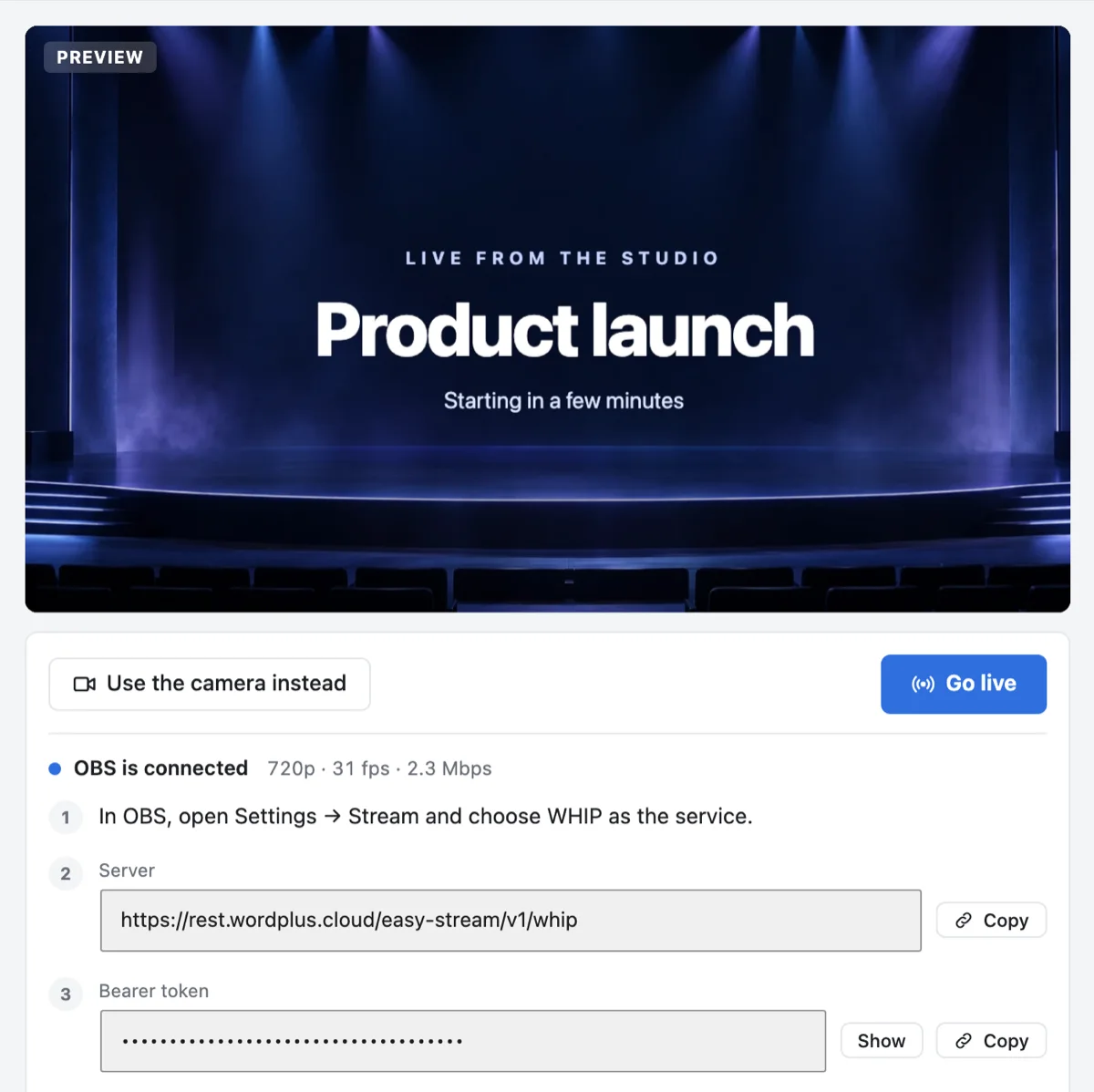
- From OBS 30 or later, or any WHIP encoder. The studio gives a server address and a bearer token. OBS sends its offer to WordPlus Cloud with that token, the cloud checks it, and the picture then flows straight to the media server, which passes it on to each viewer. Before you go live, the studio shows what arrives from OBS, its size, frame rate and bitrate, and says when the keyframes are too far apart or B-frames make it stutter (Streaming from OBS).
What it does not do: it takes no RTMP yet, so an encoder or app that only sends RTMP cannot stream to it. Streaming in over RTMP is planned, with no date. Until then, OBS 30 or later, FFmpeg 8 and the studio in the browser all send what it takes.
What it costs
The plugin is free to download, and streaming runs on a WordPlus Cloud subscription. Each site streams to 50 viewers at once unmetered, however long they watch. Above that, each viewer takes a credit a minute. Each WordPress site adds 5,000 credits a month to its account, and more are on the pricing page of WordPlus Cloud. Recording takes a credit a minute besides. Hosts take no credits, whether they send from the browser or from OBS. The details are in Viewers and credits.
Frequently asked questions
Is RTMP dead?
Not on the way in. Browsers stopped playing it when Flash ended, but encoders and streaming services still use it to send streams, and Enhanced RTMP gave it newer codecs in 2023. WHIP now does the same job over WebRTC, with lower delay.
Is WebRTC faster than RTMP?
To the viewer, yes. A stream that stays WebRTC plays about a second behind the host. A stream sent over RTMP and watched as HLS usually plays several seconds behind or more, and most of that delay is the HLS part, not RTMP itself.
Can a browser play RTMP?
No. Browsers played RTMP through Flash Player, and Flash content has been blocked since January 2021. A stream sent over RTMP is turned into HLS, DASH or WebRTC before anyone watches it.
Can OBS stream over WebRTC?
Yes, over WHIP, since OBS 30. Choose WHIP as the service in Settings → Stream, and enter the server and the bearer token your service gives.
Can RTMP be turned into WebRTC?
Yes, by a media server that takes RTMP, encodes the sound again as Opus and gives the stream to viewers over WebRTC. Sending WHIP from the encoder avoids that work.
Does Live Stream take RTMP?
Not yet. It takes streams over WHIP, from OBS 30 or later and any other WHIP encoder, and from the browser. RTMP is planned.