Live Streams on a BuddyPress or BuddyBoss Community
To live stream on a BuddyPress or BuddyBoss community, put the stream on a page of the community itself and let its accounts decide who watches: members sign in as they always do, watch about a second behind the host, and chat under the names and avatars of their profiles. A Live tab for each group takes a few lines more, which this post gives in full.
It goes through what a stream on a community needs, the setup with Live Stream that takes no code, then a stream for every group, hosted by its organisers and watched by its members. For every way to stream on WordPress, start with How to live stream on a WordPress site.
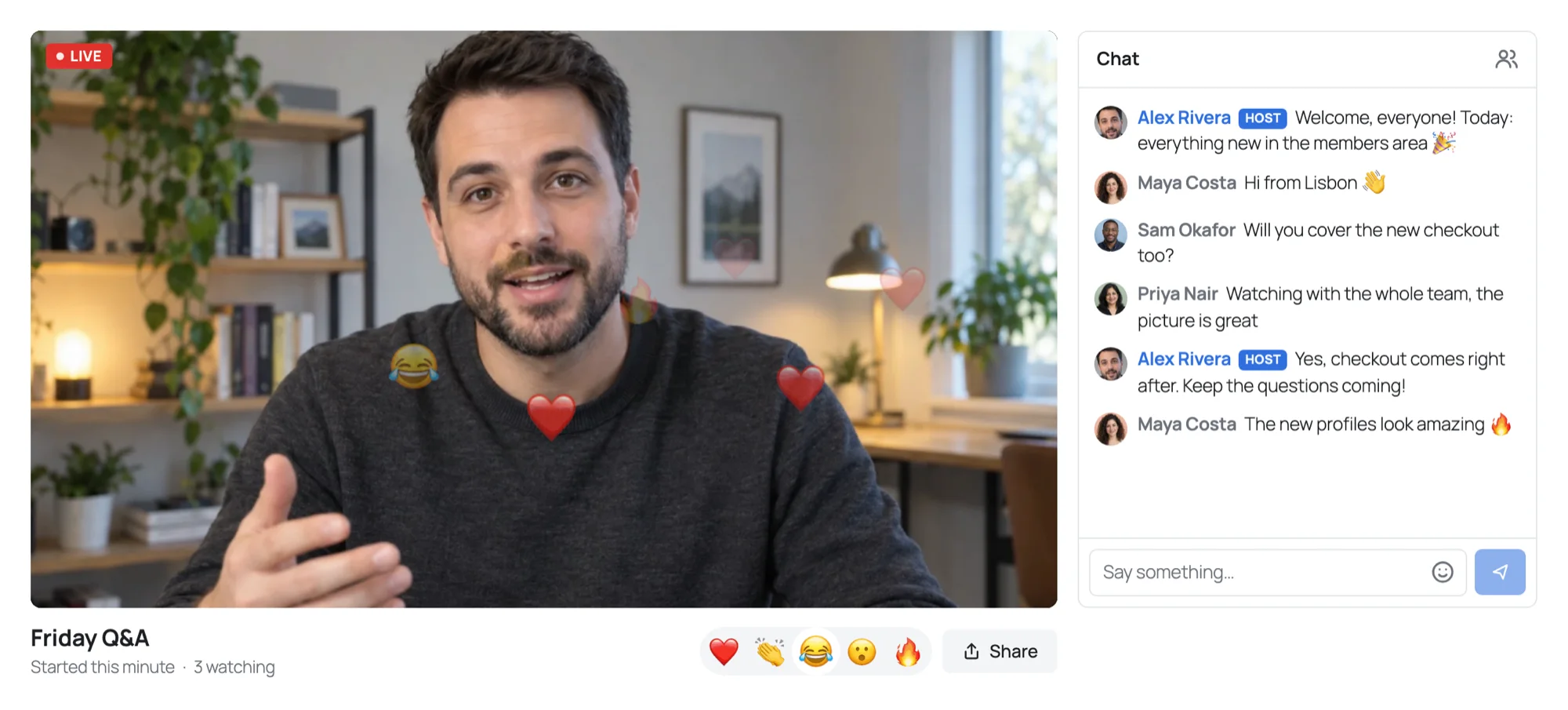
What a stream on a community needs
A community is not an audience that turns up once. Its people have profiles, friends and groups, and a stream that fits them keeps all of that:
- The accounts they already have. No second sign-in on another service, and no link to pass around. Who may watch is who the community says.
- Real names in the chat. People write as the members they are, so the talk during the stream reads like the rest of the site.
- A delay short enough to talk. A question in the chat gets its answer while it still matters. A stream over WebRTC is about a second behind the host, where one over HLS is often many seconds (WebRTC vs HLS).
- A place in the groups. Most of the life of a community is in its groups, so a group that meets on camera wants its stream in the group, not on a page somewhere else.
A video from YouTube in a frame gives the picture, but not the accounts or the chat of the site: the platform decides who watches, and people chat on the platform as whoever they are there (How to embed a live stream on your website).
A stream for the whole community, with no code
Live Stream is a live streaming plugin for WordPress, and BuddyPress and BuddyBoss are WordPress, so it works on both as on any site. Hosts go live from the browser or from OBS, and viewers watch on the pages of the site.
1. Install it
In WordPress, go to Plugins → Add New Plugin, search for WordPlus Live Stream, install and activate it, then enter your licence key under Live Stream → Licence (Getting started). To see the page first, a test stream works with no subscription. Only you can see it.
2. Create the stream and choose who watches
Open Live Stream → Studio → Streams and press Create stream. For a community, set Who can watch to one of these:
- Logged-in users: every member of the site. On a community where anyone may register, that is anyone who signs up.
- Selected roles: only the WordPress roles you tick. Member types of BuddyPress and profile types of BuddyBoss are not roles, so for those use the filter in the code below.
Administrators always get in, as they host every stream. How to run a private live stream for your members goes further into who gets in and why.
3. Put it on a page
Press Create a page beside the stream in the Studio tab, or add the Live stream block to any page and choose a layout (Putting a stream on a page). Link the page from the menu of the community. With a start time, members who come early see a countdown and Add to calendar.
4. Choose the chat
- Light chat is for the moment: text and emoji, with moderation, gone a day after the last message.
- A Better Messages chat room keeps the conversation on your site, with history. Better Messages is also the messenger many BuddyPress and BuddyBoss sites use, and on both it can pair the groups with group chats whose members follow the group (BuddyPress, BuddyBoss). A live stream inside a Better Messages chat room shows a stream there, beside the messages of a room.
Both are set up step by step in How to add a live stream with chat to your website.
5. Go live
In Live Stream → Studio, choose Go live beside the stream, from the camera and microphone, a shared screen, or OBS over WHIP. Moderators pin, delete, mute, remove and ban in the chat (Moderating a live stream chat).
A Live tab in every group
Live Stream has no BuddyPress setting of its own: it does not add a tab to groups by itself. It has an API for that (Live streams in your plugin), and BuddyPress and BuddyBoss both let a plugin add a tab to a group. Put together, this small plugin gives every group:
- A Live tab, seen by the members of the group, with the stream of the group in it and the chat beside the player.
- Its own stream, made the first time someone opens the tab, and named after the group.
- Its organisers as hosts. The administrators and moderators of the group go live in the tab itself, with the camera, a screen or OBS. They need no access to the WordPress admin.
- Its members as viewers, and nobody else but the administrators of the site.
- The stream goes with the group when the group is deleted.
<?php
/**
 * Plugin Name: Group live streams
 * Description: A Live tab in each group, where its organisers go live and its members watch.
 */

defined( 'ABSPATH' ) || exit;

// The stream of a group, made the first time its tab is opened.
function group_live_stream( $group_id ) {
	$stream = wordplus_streams()->get_object_stream( 'bp_group', $group_id );

	if ( $stream ) {
		return $stream['id'];
	}

	$group = groups_get_group( $group_id );
	$made  = wordplus_streams()->create( array(
		'title'       => $group->name,
		'object_type' => 'bp_group',
		'object_id'   => $group_id,
		'settings'    => array( 'access' => 'logged_in', 'chat_with' => 'light' ),
	) );

	return is_wp_error( $made ) ? 0 : $made;
}

// The Live tab, for the members of the group.
add_action( 'bp_include', function () {
	if ( ! function_exists( 'wordplus_streams' ) || ! bp_is_active( 'groups' ) ) {
		return;
	}

	class Group_Live_Tab extends BP_Group_Extension {
		public function __construct() {
			parent::init( array(
				'slug'              => 'live',
				'name'              => __( 'Live', 'group-live' ),
				'nav_item_position' => 35,
				'access'            => 'member',
				'show_tab'          => 'member',
				'screens'           => array(
					'create' => array( 'enabled' => false ),
					'edit'   => array( 'enabled' => false ),
					'admin'  => array( 'enabled' => false ),
				),
			) );
		}

		public function display( $group_id = null ) {
			$stream_id = group_live_stream( $group_id ? $group_id : bp_get_current_group_id() );

			if ( ! $stream_id ) {
				return;
			}

			if ( wordplus_streams()->user_can( $stream_id, 'host' ) ) {
				echo wordplus_streams()->render( $stream_id, array( 'part' => 'studio' ) );
			}

			echo wordplus_streams()->render( $stream_id, array( 'layout' => 'side' ) );
		}
	}

	bp_register_group_extension( 'Group_Live_Tab' );
} );

// The administrators and moderators of a group host its stream.
add_filter( 'wordplus_stream_can_host', function ( $can, $stream_id, $user_id ) {
	$group = wordplus_streams()->get_object( $stream_id );

	if ( $group && 'bp_group' === $group['type'] ) {
		return groups_is_user_admin( $user_id, $group['id'] ) || groups_is_user_mod( $user_id, $group['id'] );
	}

	return $can;
}, 10, 3 );

// Only the members of a group watch its stream.
add_filter( 'wordplus_stream_can_watch', function ( $can, $rules, $user_id, $stream_id ) {
	$group = wordplus_streams()->get_object( $stream_id );

	if ( $group && 'bp_group' === $group['type'] ) {
		return $can && $user_id > 0 && groups_is_user_member( $user_id, $group['id'] );
	}

	return $can;
}, 10, 4 );

// The Live now list and the links the player shares go to the Live tab.
add_filter( 'wordplus_stream_page_url', function ( $url, $stream_id ) {
	$object = wordplus_streams()->get_object( $stream_id );

	if ( ! $object || 'bp_group' !== $object['type'] ) {
		return $url;
	}

	$group = groups_get_group( $object['id'] );
	$base  = function_exists( 'bp_get_group_url' ) ? bp_get_group_url( $group ) : bp_get_group_permalink( $group );

	return trailingslashit( $base ) . 'live/';
}, 10, 2 );

// The stream goes with its group.
add_action( 'groups_before_delete_group', function ( $group_id ) {
	if ( ! function_exists( 'wordplus_streams' ) ) {
		return;
	}

	$stream = wordplus_streams()->get_object_stream( 'bp_group', $group_id );

	if ( $stream ) {
		wordplus_streams()->delete( $stream['id'] );
	}
} );
Save it as group-live-streams.php in wp-content/plugins and activate it. The same file runs on BuddyPress and on BuddyBoss Platform, which keeps the group functions of BuddyPress under the same names. The one place they differ is the address of a group: BuddyPress 12 and later have bp_get_group_url(), and BuddyBoss has bp_get_group_permalink(), so the code asks which one is there.
How it works
- The tab is a group extension, registered on
bp_include, which runs before BuddyPress and BuddyBoss set their group extensions up onbp_init.accessandshow_tabset tomemberkeep the tab to the members of the group, and the screens turned off keep it out of creating and managing a group. - The stream of each group is made for it (
object_typebp_group,object_idits ID), soget_object_stream()finds it again each time, and the filters read what it was made for withget_object(). - Who hosts and who watches come from the group itself, through
wordplus_stream_can_hostandwordplus_stream_can_watch. A member who joins the group today watches today, and one who leaves is out at the next join. Someone else who opens the address of the tab sees no tab, and the player itself turns away anyone the filters keep out. - The light chat is set on purpose. A Better Messages chat room for a stream is made when an administrator saves the stream, so set
chat_withtobetter_messagesonly where an administrator will do that (Settings). - In the admin, each group stream shows in Live Stream → Studio → Streams like any other, where an administrator can change its settings.
Going further
- A post in the feed of the group while it is live: the action
wordplus_stream_liveruns as a stream goes live, andwordplus_stream_endedas it ends, with how long it lasted (Hooks). - Every member going live from a page of their own, as in Example: members going live, with the profile of the member in place of a post.
- A Live badge in the list of groups, from
wordplusStreams.livein the browser, as Example: live events draws one beside each event. - A schedule: the
sessionssetting gives a stream its planned times, and the player counts down to the next one.
What it does not do
- No group tab without code. The plugin above is the way, and it is all of it.
- Members do not go live by themselves. Administrators host every stream, and the hosts your code names, here the organisers of each group.
- No RTMP and no guests on stage. Encoders send over WHIP, hosts are on camera, and viewers write and react.
- No word filter or reports in the light chat. Moderators act on what they see.
- It needs a WordPlus Cloud subscription that includes live streaming.
What it costs
Every stream of the site counts together, the groups included. The plugin is free to download, and streaming runs on a WordPlus Cloud subscription. Each site streams to 50 viewers at once unmetered, however long they watch, and each viewer above that takes a credit a minute. Each WordPress site adds 5,000 credits a month to its account, and more are on the pricing page of WordPlus Cloud.
An example: three groups each stream a weekly meeting of an hour, at different times, to 30 members each. No meeting passes 50 viewers at once, so they take no credits. Two of them at the same time, 60 viewers in all, take 10 credits a minute for the 10 above 50, 600 for the hour. Recording takes a credit a minute besides. Hosts take no credits. What a live stream on your website costs works out more cases, and Viewers and credits has the details.
Frequently asked questions
Can I live stream on BuddyPress?
Yes. BuddyPress runs on WordPress, so a live streaming plugin for WordPress works there: with Live Stream, the stream plays on a page of the community, and its members watch and chat under their own accounts.
Does it work with BuddyBoss?
Yes. BuddyBoss Platform began as a fork of BuddyPress, and the setup with no code is the same. The code for a group tab runs on both, as it checks which function gives the address of a group.
Can each BuddyPress group have its own live stream?
Yes, with the small plugin in this post: every group gets a Live tab and a stream of its own, hosted by its organisers and watched by its members. Live Stream does not add that tab by itself.
Can members of a group go live?
The administrators and moderators of a group can, with the code above. To let every member host, change the wordplus_stream_can_host filter to check groups_is_user_member() instead.
Is a group stream private?
As private as the group. Only its members get the tab, and only its members get the stream, whatever the group is set to. The administrators of the site always get in.
How many members can watch?
As many as come: a stream has no limit of viewers. The first 50 at once on each site are unmetered, and each viewer above them takes a credit a minute.