A Live Stream Inside a Better Messages Chat Room
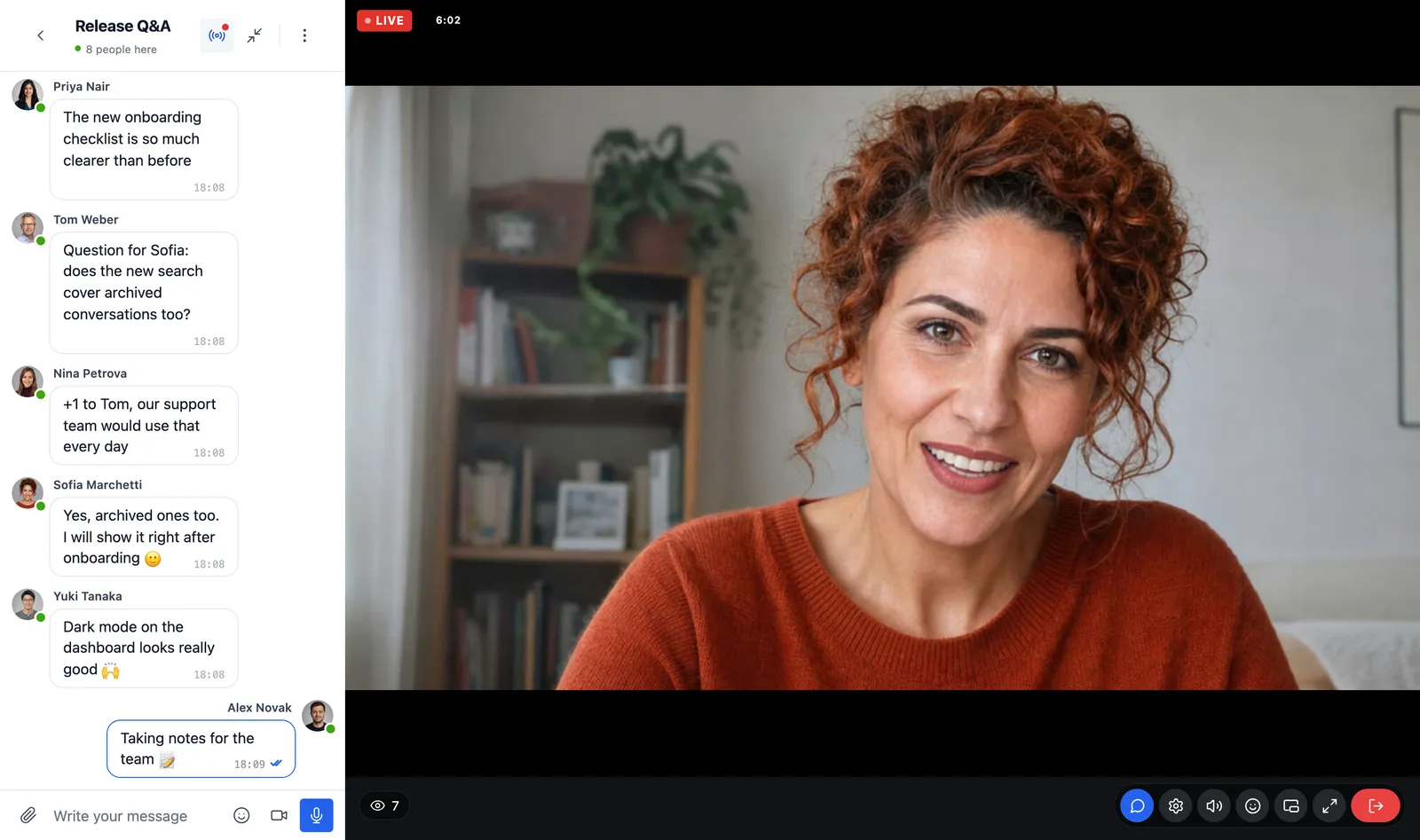
A community already talks in its chat rooms. When someone goes live, the natural place to watch is right there, beside the conversation the members are already in. With Live Stream and Better Messages, a chat room can host a live stream: it shows in the room the way a group video call does, and the room is the chat of the stream, with its history, its moderation and its members.
This post shows what members see, how a host goes live from the room, and how to set it up.
Why stream in a chat room
Live Stream has its own light chat: text and emoji for the moment, with moderation, run by WordPlus Cloud and gone a day after the last message. That suits a public show. A community usually wants more:
- The conversation stays. Messages are saved on your site, with history and export, so what was said during the stream is there the next day.
- Everything a chat room has: files, GIFs, stickers, mentions, and the notifications and moderation of Better Messages.
- The people are already there. Members do not go to another page to watch, and the room is where they talk about the stream before it starts and after it ends.
What members see
- The stream beside the messages. While the stream of a room is live, it opens by itself where a group video call would, beside the messages of the room.
- A Live banner over the messages and a button in the header of the room bring it back after someone closes it.
- The player among the call controls: sound and volume, the quality of the picture, reactions, picture-in-picture and full screen.
- On a phone, the stream sits on top and the chat under it.
A member who closes the stream stays in the chat, and is not counted as watching until they open it again. Where the stream should not be closed while it is live, Always on screen in the room keeps it there.
Going live from the room
The host goes live without leaving the conversation. The button in the header of the room opens their preview, with the camera, the microphone and screen sharing in the call controls, then Go live and, at the end, End stream. While live, the host sees how the picture goes out and how many watch, and a summary once it ends.
For scenes, overlays and several cameras, the host streams from OBS in Live Stream → Studio instead, and the stream still shows in the room (How to stream from OBS to WordPress over WHIP).
Setting it up
What you need
- Better Messages 3.1 or later, its WebSocket version with an active licence. Its free version has no realtime connection, so every viewer would keep asking your site for new messages.
- Live Stream, on the same WordPlus Cloud subscription. A site whose Better Messages already runs on it is connected without entering a key again.
From the room
- Open Better Messages → Chat Rooms and edit the room.
- Below the group call settings, choose Stream in this room. Live Stream makes a stream for the room, named after it, with the room as its chat.
- The room now has a Live streaming section with Go live, Stream settings, Always on screen in the room and Stop streaming here.
From the stream
Or start in Live Stream: open Live Stream → Studio → Streams, choose the stream, and set its chat to Better Messages chat room. The room is made when you save. A new stream gets one by itself where Better Messages runs its WebSocket version with an active licence.
Stop streaming here takes the stream out of the room, and the stream keeps a light chat of its own.
Who can watch and who can write
Each stream chooses who watches: everyone, logged-in members, or the roles you choose. Who writes in the room, guests, files and moderators are the settings of the room, under Better Messages → Chat Rooms. On a public stream, visitors chat as guests where the room allows them.
The room shows wherever the chat of the stream does: beside the player on the page of the stream, in the studio of the host, and in Better Messages itself.
Ideas for a community
- A weekly Q&A in the main room of the community, the questions saved for those who missed it.
- A members only room for paying members, with a stream only their role may watch.
- A course cohort whose teacher goes live in the room of the class, with the files of the lesson shared in the same chat.
- A launch or an event where the room fills up before the start, and keeps talking after the end.
Frequently asked questions
Does Live Stream need Better Messages?
No. Live Stream works on its own, with its light chat. Better Messages adds the chat room.
Does Better Messages carry anything of Live Stream when it is not installed?
No. Better Messages shows a row about Live Stream in the room editor of its WebSocket version, and nothing else until Live Stream is installed.
Can members go live in a room?
Administrators host streams. Another plugin can let more people host with the hooks of Live Stream (Live streams in your plugin).
Where are the docs?
On both sides: Chat and moderation in the docs of Live Stream, and Live streaming in chat rooms in the docs of Better Messages.